Keep shelf prices in step.
RetailLume provides electronic shelf tags and digital price labels for independent liquor stores, vape shops, and small retailers—so your team spends less time printing paper tags and searching aisles, prevents misplaced or outdated shelf prices, and keeps more staff time focused on customers.
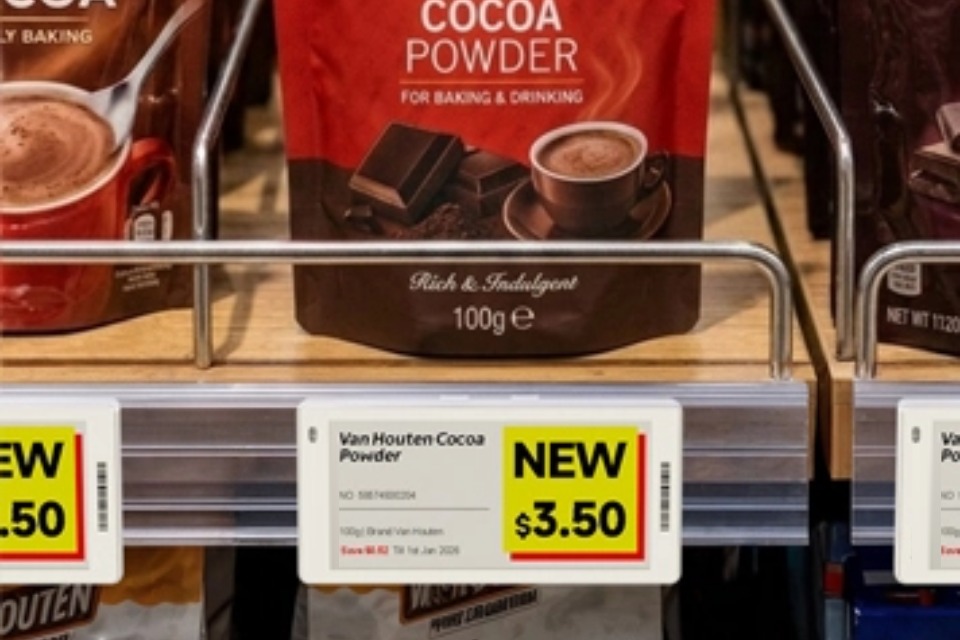
Rail-Mounted Shelf Context: Electronic shelf tags clip into standard retail shelf channels directly beneath product facings so shoppers and staff see clear pricing, promotional callouts, and item barcodes at the shelf edge.
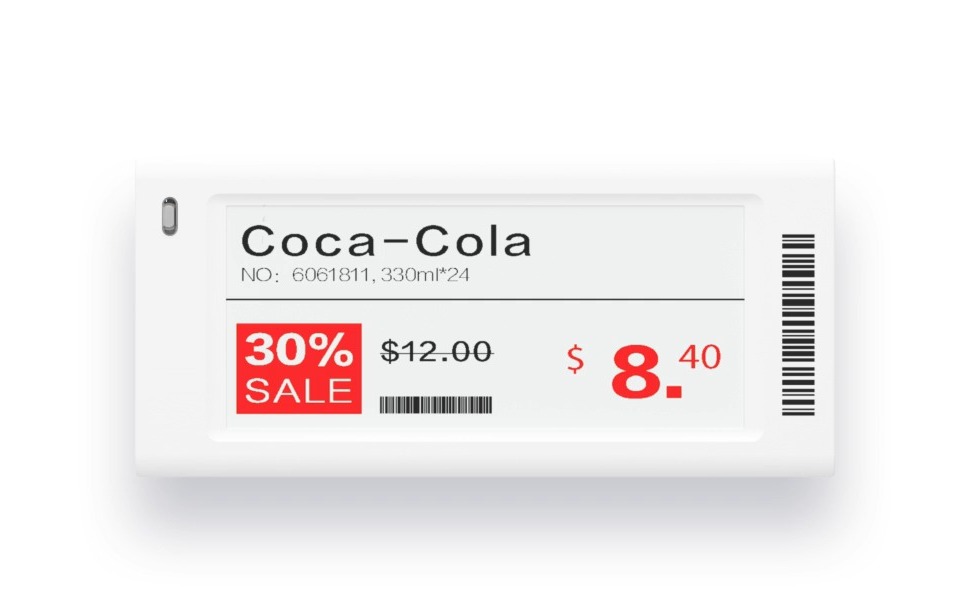
Close-Up 2.9" E-Paper Tag: Shows product name, SKU and pack size, regular and promotional pricing, scannable barcodes, and the top-left status LED window (model-dependent).
What Customers & Staff See at the Shelf Edge
Crisp e-paper shelf labels display product names, bottle or pack sizes, selling prices, promotions (where configured), and scannable barcodes or QR codes.
Electronic Shelf Label Demo & Validated 2.9" Store Tag
Reference demonstration video hosted by RetailLume. We confirm the right tag model and mounting clips for your shelving during your store review.
| Sample Store Product | Container / Pack Size | Displayed Shelf Price | Display Template Mode | Mapping State (Illustrative) |
|---|---|---|---|---|
| Cabernet Sauvignon Reserve | 750ml Bottle | $15.49 | Standard Shelf Price | Mapped to Shelf Label |
| Prairie Hazy IPA | 6-Pack 12oz Cans | $11.99 | Weekend Feature (Supported Templates) | Mapped to Shelf Label |
| Small Batch Kentucky Bourbon | 750ml Bottle | $34.99 | Standard Shelf Price | Mapped to Shelf Label |
| Sparkling Mineral Water | 750ml Glass | $2.49 | Unassigned in Sample View | Unpaired Sample |
Why Paper Shelf Labels Drain Store Time
Changing prices in the POS takes seconds—putting those changes onto hundreds of physical shelf edges is where the work piles up.
Printer Setup & Walking the Aisles
For every batch of distributor cost changes or weekend specials, staff have to load label sheets, print, separate tags, walk the aisles, search shelves for the exact bottle or pack, replace the paper tag, and verify it is under the right product.
Interruptions Stretch a Simple Task
Store staff rarely get uninterrupted time on the floor. Stepping away to ring up customers, check IDs, or receive a delivery can turn a small label batch into an unfinished chore—leaving half the aisle updated and the other half on last week's price.
Missing, Damaged, or Outdated Tags
Paper labels and promotional shelf talkers get knocked off, curled by humidity, or left up after a sale ends. An outdated or missing shelf price creates register friction, price checks, and extra manual work for managers.
What Electronic Shelf Labels Can Do
Practical shelf-edge capabilities designed for everyday retail operations, with clear boundaries around hardware models and POS integrations.
Show Product Details & Shelf Prices
High-contrast e-paper screens display the product name, bottle or pack size, unit price, and scannable barcode or QR code (where supported by the label template) clearly under normal store lighting.
Display Promotions & Price Changes
Supported label templates can highlight sale pricing alongside product details once a price or promotion change is approved in your connected pricing workflow.
Centralized Updates & Pause Control
Where your POS integration and store configuration support it, price updates flow wirelessly to mapped tags—while RetailLume's store-level pause control lets you hold physical floor updates whenever needed.
Flashing LED for Locating (Select Models)
Select electronic label models include a built-in LED indicator that can flash to help staff locate a specific item on a crowded wine or spirits aisle during restocking or audits.
Larger Formats & Promotional Displays
Standard 2.13"–2.9" e-paper labels fit shelf channels, while larger e-paper tags and separate digital signage products are available for case stacks, endcaps, and promotional displays.
Model & Integration Transparency
Not every label model has every capability. Screen colors, LED indicators, NFC/QR support, and cooler temperature ratings depend on the exact hardware model and verified POS setup we confirm for your store.
How It Works in Four Clear Steps
Accurate shelf updates depend on clean product-to-label mapping and the right integration for your store.
Confirm Your POS, Product Data & Goals
We start by reviewing your current POS system, how your products and barcodes are organized, your shelf edge fixtures, and how frequently you change prices or run promotions.
Select Hardware & Map Labels to Products
We recommend the appropriate label sizes, mounts, and wireless base stations for your store layout. Each physical label barcode is paired to its exact product variant so updates go to the right shelf spot.
Connect the Supported Pricing Workflow
Connect your supported POS or catalog workflow so approved selling prices update in RetailLume. Store-level pause controls let you verify catalog imports in an isolated workspace before updating physical labels.
Update Labels & Give Staff More Floor Time
Approved price updates are transmitted wirelessly to the mapped shelf labels and logged in RetailLume—helping your team spend less time printing paper tags and more time serving customers.
Practical Operational Benefits on the Sales Floor
Fewer Routine Paper Labels to Print & Replace
Reduces the weekly cycle of loading label sheets, printing, trimming paper tags, snapping plastic rail covers on and off, and discarding routine paper-label and printing waste.
Less Time Walking & Searching Aisles
Once a tag is paired to its product on the shelf, routine price updates do not require staff to walk every aisle hunting down individual bottles, flavors, or SKUs.
Fewer Misplaced or Outdated Shelf Tags
Helps reduce opportunities to accidentally slip a new paper label under a neighboring bottle or leave an expired weekend promo price on the shelf after a rush.
More Staff Time for Customers & Merchandising
Frees up floor hours for helping shoppers, ringing up the register, restocking high-moving items, and keeping displays clean.
Start with ~100 Items & Expand Later
Retailers may begin with roughly 100 of their best-selling or most frequently repriced products—pairing tags only to those selected catalog items while keeping the rest of the catalog in the workspace—then expand later. Final physical tag quantity depends on how many shelf positions those items occupy and on commercial hardware pack sizes confirmed during quoting.
Our software and wireless base-station architecture support starting with a focused group of high-churn products before expanding—with base-station coverage, cooler ratings, shelf positions, and hardware pack sizes confirmed for your specific store setup. Read our practical FAQ for details.
Support Approved Store Promotions with Less Routine Shelf-Tag Travel
Distributors and suppliers spend significant field time driving between stores (for example, roughly 35–45 minutes between stores and $3–$4 per gallon for fuel in our owner's Kansas route planning example) just to locate products and replace paper, laminated, or plastic shelf talkers that fall off, get removed, or become outdated. Where participating stores have compatible hardware, supported integrations, and explicit retailer approval, RetailLume helps streamline approved shelf promotions so route time can be redirected to sales and store relationships:
Replace Fragile Paper & Plastic Talkers
Prepare clean, standardized promotional designs and approved shelf content without relying on paper, laminated, or plastic talkers that fall off, curl, or stay up past a promotion's end date.
Redirect Route Time to Sales & Relationships
Where the store's hardware and approved integration support remote updates, reps can spend less time driving store-to-store just to swap tags and more time building account relationships. Any product or sales insights depend on the specific POS data and integration available.
Retailers Always Retain Pricing Control
Every retailer retains full ownership and control over their store pricing. Supplier or distributor promotion and design updates always require explicit retailer approval before appearing on a shelf label.
Estimate Your Current Paper-Label Workload & Outdated-Price Exposure
The slowest part of a manual price change is often walking the store, finding the right bottle or item on the shelf, checking it, and replacing its paper tag—work that is frequently interrupted. Enter your store's numbers below to estimate labor time/cost and outdated-price mismatch exposure separately. All results are labeled as estimates, not guaranteed savings or recovered profit.
Estimate Route Travel Time & Fuel Spent on Routine Shelf-Talker Visits
Field reps often drive between stores just to locate products and replace paper, laminated, or plastic shelf talkers that fall off or expire. The defaults below use our owner's Kansas planning assumptions as an example only (roughly 35–45 minutes of driving between stores and $3–$4 per gallon for fuel)—not universal facts. Edit any field to reflect your territory.
Tell Us About Your Store Setup
Share your POS system and approximate label count below. Because every store's shelving, POS workflow, and tag mix is different, we confirm your setup first before recommending hardware or quoting a system.
What Happens When We Review Your Setup
- POS & Catalog Check: We confirm your POS platform, how item prices and promotions are stored, and whether an active or planned connector fits your timeline.
- Shelf & Hardware Fit: We check your approximate SKU count, shelf rails, and store layout to recommend appropriate label models and base stations.
- Tailored Quote or Live Demo: We walk through the merchant console and provide a recommended pilot or store quote based on confirmed requirements.